
Why Your Business Is Not Showing on Google Maps in the UAE (and How to Fix It)

If your business is not showing on Google Maps in the UAE, the cause is almost always one of three things: the profile is not verified, it has been suspended or restricted, or it is live but not ranking for the searches you care about. Each has a different fix, so the first job is working out which one you are dealing with.
Below is the checklist we work through when a UAE client tells us their listing has vanished or never showed up. Google Business Profile is the tool formerly called Google My Business; the rules are the same, only the name changed.
Is it hidden or just not ranking? Start with this test
Before you change anything, run three quick checks:
- Search your exact business name on Google Maps, on a phone, with location turned on.
- Search your name plus area, for example “your company name Al Quoz”.
- Open your Business Profile dashboard while signed in to the owning Google account and read any notice at the top: “Get verified”, “Pending”, “Not visible to customers” or “Suspended”.
If your name search returns nothing and the dashboard shows a notice, you have a visibility problem. If the name search works but service searches do not, skip ahead to the ranking sections.
Is your Google Business Profile verified?
An unverified profile usually does not show publicly. This is the most common cause for newer businesses, and in our experience in Dubai, Sharjah and Ajman it is where most people get stuck.
According to Google’s verification help page, the available methods are:
- Video recording made through your profile on a mobile device
- Live video call with a Google support representative, during your business hours
- Phone call or text with a code (IVR phone systems cannot receive it)
- Email to an address you can access
- Postcard mailed to your business address
Two points that save a lot of frustration. First, Google decides which methods you are offered and you cannot change them; they depend on your business type, region, public information and hours. Second, Google says reviews take up to 5 business days after you finish the steps, and rarely longer.
Why video verification fails
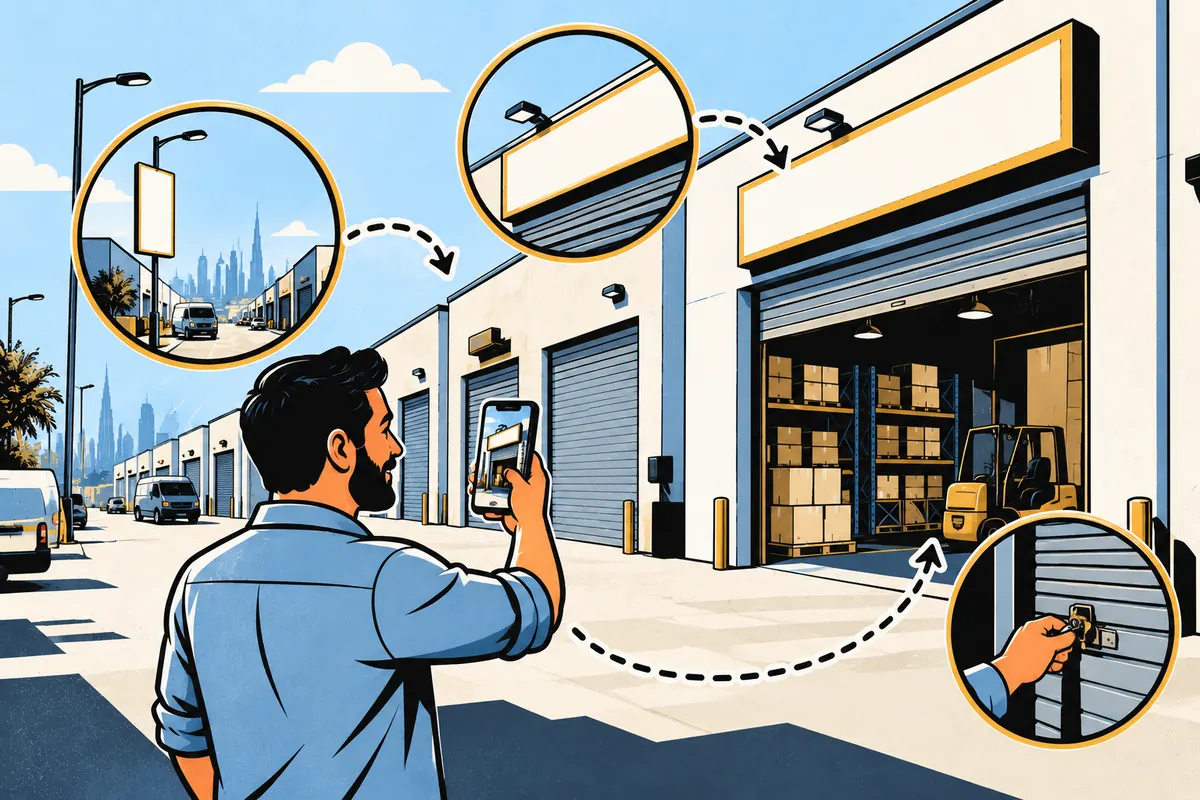
Video is the method many UAE businesses are offered now. Google requires one live, unedited, continuous recording of at least 30 seconds, uploaded from your phone through the profile. It should show:
- Where you are: street signs, building name or number, neighbouring shops
- That the business exists: signage with the same name as your profile
- That you manage it: unlocking the door, opening the office, using the till or equipment
Videos fail when the signage does not match the profile name, when the building has no visible identifiers (common in warehouse rows and industrial plots), or when the video is just the inside of an office. If Google shows “Review issues”, fix the specific gap it names before you record again. Re-shooting the same clip rarely changes the result.
Has your profile been suspended?
If your listing was visible and then disappeared, check for a suspension. Google can suspend profiles that break its Business Profile guidelines, and if your Google account itself is restricted, every profile it manages goes down with it.
The usual triggers we see:
- Keywords stuffed into the business name (“Best Plumbing Services Dubai 24/7”)
- A virtual office or flexi-desk address where nobody actually works
- Duplicate profiles for the same location
- Sudden edits to name, address and category at the same time
The fix is to correct the issue first, then submit one appeal through the Business Profile appeals tool with evidence: trade licence, tax certificate or a utility bill (DEWA, SEWA or similar) where the name and address match the profile exactly. Appeals can only be submitted once per decision, so make it complete. Do not create a new profile for the same business; that tends to make things worse.
Is your primary category wrong?
Your primary category tells Google what your business is. Google’s own test: pick categories that complete the sentence “This business IS a…”, not ones that list every service you offer.
A Sharjah MEP contractor listed as “Consultant”, or a Dubai trading company listed only as “Wholesaler” when buyers search for the specific product, will struggle to appear for the searches that matter. Choose the most specific primary category available, add a few accurate secondary ones, and put the rest of your services in the services section and on your website.
Address and pin problems that are common in the UAE
UAE addresses do not always fit Google’s address form neatly, and this causes a lot of quiet visibility issues.
P.O. boxes
Many UAE companies use a P.O. box for correspondence. Google’s guidelines say P.O. boxes and remote mailboxes are not acceptable as a business address. Use the physical location instead, with suite or office number on the second line.
Free-zone and licence-only addresses
A free-zone licence address is fine if it is a real, staffed office that receives customers during your listed hours. If it is a desk you never use, Google treats it as a virtual office, which is not eligible. In that case list your actual operating premises, or set up as a service-area business.
Industrial areas and the map pin
In places like Al Quoz, Jebel Ali, Sharjah Industrial Area or Ajman’s industrial zones, Google may place your pin on the wrong plot or the road outside. Drag the pin to your actual entrance. In Dubai and several northern emirates, the Makani system (Dubai Municipality’s geographic addressing system, with a 10-digit number on building entrances) helps you confirm the exact entrance location before you set the pin. Use landmarks in your directions for customers, but keep the address fields themselves clean.
Should you be a service-area business?
If customers do not visit you, Google wants your address hidden. Contractors, cleaners, AC technicians, pest control and mobile mechanics usually fit here. You set a service area (for example Dubai, Sharjah, Ajman) instead of showing an office.
Two things to know. A service-area business is not shown with a pin at an address, so it behaves differently in Maps results. And if you have a staffed office where customers do come in, you can show the address and also add a service area; that hybrid setup is allowed.
Does your name, address and phone match your website?
Google cross-checks what your profile says with what it finds elsewhere. If your website footer shows an old Deira office, your profile shows Business Bay, and your directory listings show a third number, Google has less confidence in any of them.
- Use the same business name everywhere, spelled the same way
- Use one primary phone number in a consistent format (+971 …)
- Put your full address on your contact page and footer, matching the profile
- Link your profile to the right page on your site, ideally the page for that location
If your website is old or does not have a proper contact or location page, that is worth fixing; our website development team builds these pages with local details set up correctly from day one.

How does Google decide who shows on Maps?
Once you are verified and compliant, visibility comes down to ranking. Google explains local ranking using three factors:
- Relevance: how well your profile matches the search. Complete, accurate details help.
- Distance: how far you are from the searcher, or from the area they typed.
- Prominence: how well known you are, including links to your site and the number of reviews and ratings.
Google also states there is no way to request or pay for a better local ranking. That means distance is partly out of your control: a business in Al Nahda will not usually appear for someone searching in Jumeirah, however well optimised it is. What you can control is relevance and prominence.
Too few reviews
Google says more reviews and positive ratings can help your local ranking, and replying to them helps you stand out. If a competitor down the road has steady recent reviews and you have three from two years ago, that gap shows. Ask every satisfied customer, make it easy with a short review link, and reply to every review, good or bad. Never buy reviews or offer incentives; that breaks Google’s policies and can lead to removal.
Symptom, cause and fix: a quick reference
| Symptom | Likely cause | Fix |
|---|---|---|
| Name search shows nothing; dashboard says “Get verified” | Profile not verified | Complete the verification method Google offers you |
| Verification “pending” for weeks | Review stalled or video rejected | Check “Review issues”, fix the named gap, re-submit once |
| Listing disappeared overnight | Suspension or account restriction | Fix the violation, appeal once with licence and utility bill |
| Shows for your name, not for your service | Wrong or vague primary category | Pick the most specific “This business IS a…” category |
| Pin on the wrong building or road | Industrial-area or unclear address | Drag pin to the entrance; confirm location with Makani where available |
| Address rejected | P.O. box or virtual office used | Use physical premises or switch to service-area |
| Shows nearby only, not across the city | Distance factor | Set an accurate service area; strengthen relevance and reviews |
| Ranks below competitors close by | Low prominence: few reviews, weak website | Build reviews steadily; align website with profile |
What to do next
Work through the checklist in order: verification, suspension, category, address, service area, consistency, then reviews. Most UAE listings we audit have two or three of these going wrong at once, and fixing the first one often uncovers the next. For the ranking side, pairing your profile with proper on-site local SEO matters; that is the work our SEO team in Dubai handles alongside Maps.
If you would rather have someone check it for you, we offer Google Business Profile optimisation in Dubai and across the UAE, including verification help, category and address fixes, and review setup. Send us your listing link through our contact page or on WhatsApp at +91 83694 99041 and we will tell you what we see.
Frequently asked questions
How long does Google Business Profile verification take in the UAE?
Google says verification reviews can take up to 5 business days after you complete the steps, and occasionally longer. Some profiles verify instantly. If yours has been pending for weeks, check for a “Review issues” message and fix what it points to rather than waiting.
Can I use a P.O. box as my Google Maps address in Dubai or Sharjah?
No. Google’s guidelines say P.O. boxes and remote mailboxes are not acceptable addresses. Use the physical premises where you meet customers, or set up as a service-area business and hide the address if you have no customer-facing location.
Why does my business show on Google Maps for my name but not for my services?
That usually means the profile is live but not ranking. Check your primary category, make sure your services are described on the profile and on your website, and build reviews. Google ranks local results on relevance, distance and prominence, so a search for your name is far easier to win than a search for your service.
Can I pay Google to show my business higher on Maps?
Not in the organic results. Google states there is no way to request or pay for a better local ranking. You can run Google Ads with location assets, which appear as labelled ads, but that is separate from your organic Maps position.
Does my free-zone office qualify for a Google Business Profile?
It can, if it is a real, staffed location that receives customers during your stated hours. A flexi-desk or virtual office where you only hold a licence address does not qualify under Google’s rules, and listing one is a common reason profiles get suspended.
Keep reading
 How to Get Your UAE Business Recommended by ChatGPT, Gemini and Google’s AI Answers
 Google Ads vs Meta Ads for UAE B2B Companies: Where Should Your Budget Go First?
 Shopify vs WooCommerce for UAE Businesses: Which Should You Build Your Online Store On?
 What a B2B Website in the UAE Needs to Win a Supplier Comparison